PicTok : AI Photo Generator1.2.7
Publisher Description


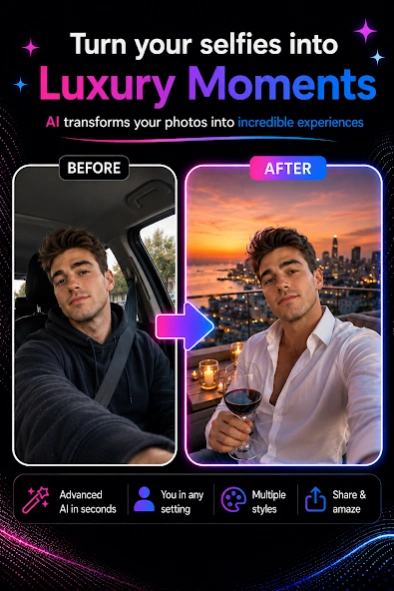
Create realistic AI photos, videos, portraits and new looks from one selfie.
Turn one selfie into realistic AI photos, portraits, profile pictures and videos.
PicTok is an AI photo generator and photo-to-video app that helps you create professional portraits, explore new hairstyles and looks, design couple photos, visit dream destinations and produce eye-catching social media content.
Upload a photo, choose a template and let PicTok create a personalized result in just a few steps. No advanced photo editing skills are required.
ONE PHOTO. ENDLESS POSSIBILITIES.
With PicTok, you can:
• Create realistic AI photos from one selfie
• Turn photos into dynamic AI videos
• Generate personalized AI portraits
• Make professional profile pictures and headshots
• Try different hairstyles, hair colors and looks
• Explore new outfits and fashion styles
• Create couple, friendship and family photos
• Design birthday and special occasion pictures
• Place yourself in travel and lifestyle scenes
• Make creative content for Instagram, TikTok and other social platforms
REALISTIC AI PHOTO GENERATOR
PicTok uses advanced artificial intelligence to create personalized images based on your uploaded photo.
The app aims to preserve your recognizable facial features and natural appearance, helping each result feel more realistic, personal and similar to you.
Choose from a growing collection of backgrounds, outfits, visual styles and creative concepts. Turn one selfie into a professional photoshoot, cinematic portrait, travel photo or new profile picture.
TURN PHOTOS INTO AI VIDEOS
Bring your favorite photos to life.
Transform a portrait, couple photo or special memory into a dynamic AI video. Save the result to your device and share it with friends and family.
PROFESSIONAL PROFILE PICTURES
Create high-quality profile photos for social media, messaging apps, personal projects and professional profiles.
Explore modern, elegant, classic and creative portrait styles without arranging a traditional photoshoot.
TRY NEW HAIRSTYLES AND LOOKS
See how you could look with a different hairstyle, new hair color, outfit or personal style.
Explore multiple looks virtually before deciding whether to change your appearance.
CREATIVE AI TEMPLATES FOR EVERY MOMENT
Discover new AI templates for:
• Professional portraits and photoshoots
• Couples, friends and families
• Birthdays and special occasions
• Travel and famous destinations
• Fashion, hairstyles and new looks
• Creative and viral social media content
SIMPLE AND FAST
1. Upload a clear photo.
2. Choose an AI template.
3. Start generating your photo or video.
4. Save or share the finished result.
Coins are required to generate AI photos and AI videos. Coin packages can be purchased directly inside the app.
Create realistic portraits, profile pictures, videos and new styles from a single photo with PicTok. Upload your selfie and discover what you can create with AI.
About PicTok : AI Photo Generator
The company that develops PicTok : AI Photo Generator is Blooms Studio. The latest version released by its developer is 1.2.7.
To install PicTok : AI Photo Generator on your Android device, just click the green Continue To App button above to start the installation process. The app is listed on our website since 2026-09-03 and was downloaded 2 times. We have already checked if the download link is safe, however for your own protection we recommend that you scan the downloaded app with your antivirus. Your antivirus may detect the PicTok : AI Photo Generator as malware as malware if the download link to com.nikaat.pictok is broken.
How to install PicTok : AI Photo Generator on your Android device:
- Click on the Continue To App button on our website. This will redirect you to Google Play.
- Once the PicTok : AI Photo Generator is shown in the Google Play listing of your Android device, you can start its download and installation. Tap on the Install button located below the search bar and to the right of the app icon.
- A pop-up window with the permissions required by PicTok : AI Photo Generator will be shown. Click on Accept to continue the process.
- PicTok : AI Photo Generator will be downloaded onto your device, displaying a progress. Once the download completes, the installation will start and you'll get a notification after the installation is finished.
